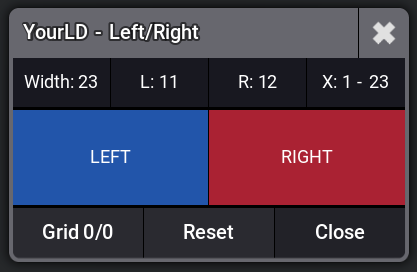
Click image to enlarge
▶ Demo Videos
Manual
Via Macro
About this Plugin
Left & Right Generator is a grandMA3 plugin that instantly splits your fixture selection into a left and right half based on the selection grid X axis.
Select a group, click Left or Right, and you're done. The plugin reads the grid positions of every fixture in your selection, calculates the center point, and cleanly divides your rig into two halves.
Use the built-in Rebase function to reset grid positions to 0/0 after splitting, making it easy to store clean groups or continue working with a fresh grid layout.
Ideal for creating symmetrical looks, left/right chases, or quickly building split groups. Optionally store the result directly into a new or existing group with merge or overwrite mode.
For full automation the plugin exposes a Lua API that can be called from macros or other plugins.
Select a group, click Left or Right, and you're done. The plugin reads the grid positions of every fixture in your selection, calculates the center point, and cleanly divides your rig into two halves.
Use the built-in Rebase function to reset grid positions to 0/0 after splitting, making it easy to store clean groups or continue working with a fresh grid layout.
Ideal for creating symmetrical looks, left/right chases, or quickly building split groups. Optionally store the result directly into a new or existing group with merge or overwrite mode.
For full automation the plugin exposes a Lua API that can be called from macros or other plugins.
Features
One-click split of any fixture grid into left or right half
Automatic grid width detection and center point calculation
Rebase grid positions to 0/0 after splitting
Store result directly to a group (merge or overwrite mode)
Programmable Lua API for macro and plugin integration
Works with any fixture type and grid layout
Free
No payment required
- - Instant download
- - Free updates included
Requirements
- • grandMA3 software version 1.9 or higher
- • grandMA3 console or grandMA3 onPC
- • Fixtures patched and arranged in a selection grid
📦 Latest Version
v1
Feb 26, 2026
initial release
Quick Start
- Import the plugin into your grandMA3 showfile
- Select a group with fixtures arranged in a grid
- Click the plugin to open the interface
- Click Left or Right to select that half
- Use Grid 0/0 to rebase the selection to position 0/0
- Optionally store the result to a group
Interface
| Button | Function |
|---|---|
| Left | Select the left half of the grid |
| Right | Select the right half of the grid |
| Grid 0/0 | Rebase the current selection to grid position 0/0 |
| Reset | Clear the selection |
The info bar shows: grid Width, L (left columns), R (right columns), and the X range.
Lua Commands
Open Interface
Lua "YldLeftRight()"Direct Execution
Lua "YldLeftRight(gridGroup, side, storeTarget, mode, rebase)"| Parameter | Description |
|---|---|
| gridGroup | Group name (string) or number |
| side | 'left', 'right', or 'rebase' (rebase only, no split) |
| storeTarget | (optional) Target group name or number to store result |
| mode | (optional) 'merge' (default) or 'overwrite' |
| rebase | (optional) 'rebase' to reset grid positions to 0/0 after splitting |
Examples
-- Left half of group 'All Spots', no store
Lua "YldLeftRight('All Spots', 'left')"

-- Left half, merge result into Group 101
Lua "YldLeftRight('All Spots', 'left', 101)"

-- Right half, merge into group by name
Lua "YldLeftRight(5, 'right', 'Right Spots')"

-- Left half, overwrite Group 101
Lua "YldLeftRight('All Spots', 'left', 101, 'overwrite')"

-- Left half + rebase to 0/0, merge into Group 101
Lua "YldLeftRight('All Spots', 'left', 101, 'merge', 'rebase')"

-- Right half + rebase (no store)
Lua "YldLeftRight('All Spots', 'right', nil, nil, 'rebase')"

-- Rebase only (no split)
Lua "YldLeftRight('All Spots', 'rebase')"
Store Modes
| Mode | Behavior |
|---|---|
| Merge | Fixtures are added to the existing group |
| Overwrite | Group is replaced with the current selection |
Tips
- The split is based on fixture X positions in the selection grid
- Grid Y and Z positions are preserved
- Rebase shifts all grid positions so the minimum X and Y become 0
- Use rebase before storing to get clean grid positions in your groups
- The plugin works with groups referenced by name or number