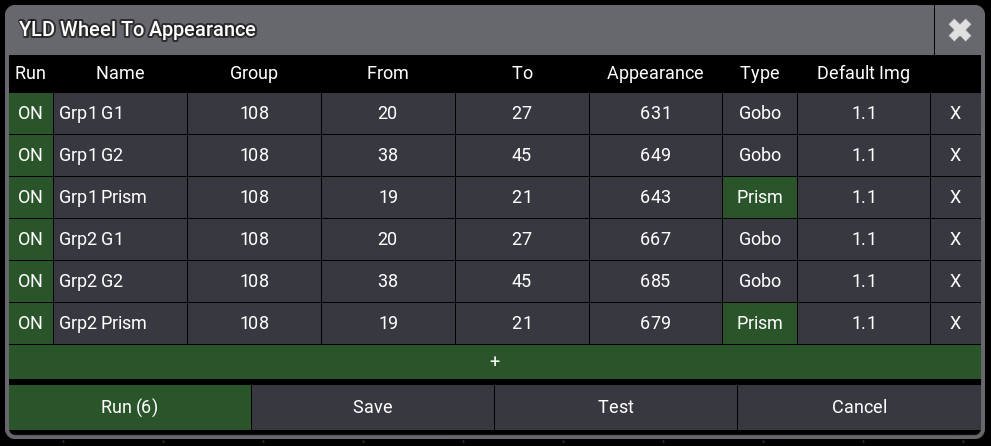
Click image to enlarge
▶ Demo Video
Demo
About this Plugin
Wheel to Appearance is a powerful grandMA3 plugin that automatically assigns gobo and prism wheel slot images to appearances based on your preset data.
Stop wasting time manually creating appearances for every gobo and prism. This plugin reads DMX values from your presets and automatically assigns the correct wheel slot images to your specified appearance range.
The plugin features an intuitive table-based interface where you can manage multiple configurations at once. Select your fixture group, specify which presets to process (e.g., 101-115), choose your starting appearance number and let the plugin do the rest. With a single click, all appearances are created with the correct gobo/prism images.
Perfect for shows with many different fixture types or large gobo libraries.
Stop wasting time manually creating appearances for every gobo and prism. This plugin reads DMX values from your presets and automatically assigns the correct wheel slot images to your specified appearance range.
The plugin features an intuitive table-based interface where you can manage multiple configurations at once. Select your fixture group, specify which presets to process (e.g., 101-115), choose your starting appearance number and let the plugin do the rest. With a single click, all appearances are created with the correct gobo/prism images.
Perfect for shows with many different fixture types or large gobo libraries.
Features
Automatic mapping of preset DMX values to wheel slot images
Support for both Gobo (Pool 3) and Prism (Pool 5) presets
Works with Gobo1, Gobo2, Gobo3, Prism1, Prism2, Prism3, and EffectWheel attributes
Table-based UI for managing multiple configurations simultaneously
Checkbox selection to run specific configurations
Full support for both 8-bit and 16-bit DMX channels
Test/Dry Run mode to preview changes before applying
Configuration saved in your showfile via GlobalVars
Automatic fixture type and attribute detection
Fallback to default image when no wheel slot is found
Progress bar with real-time status updates
Duplicate fixture type detection with warnings
€20.00
excl. 21% VAT
- - Instant download after payment
- - Free updates included
Requirements
- • grandMA3 software version 1.9 or higher
- • grandMA3 console or grandMA3 onPC
- • Fixtures with gobo/prism wheels patched and programmed
- • Gobo/Prism presets stored in the appropriate preset pools
📦 Latest Version
v1
Feb 03, 2026
Initial Release
Quick Start
- Import the plugin into your grandMA3 showfile
- Click the plugin to open the configuration table
- Click + to add a new configuration row
- Fill in: Group ID, Preset range (From/To), Appearance start number
- Select Gobo or Prism type
- Click Run to execute
Table Interface
| Column | Description |
|--------|-------------|
| Run | Toggle ON/OFF to include row in execution |
| Name | Optional label for this configuration |
| Group | Fixture group ID containing your fixtures |
| From | First preset index to process |
| To | Last preset index to process |
| Appearance | Starting appearance index |
| Type | Gobo (Pool 3) or Prism (Pool 5) |
| Default Img | Fallback image if no wheel slot found |
Lua Commands
Open Table Dialog
YldWheelToAppearance()
YldGoboToAppearance()
YldPrismToAppearance()
Direct Execution
YldWheelToAppearance({
    type = "gobo",           -- "gobo" or "prism"
    group = 1,               -- Group ID with fixtures
    presetStart = 101,       -- First preset index
    presetEnd = 115,         -- Last preset index
    appearanceStart = 1100,  -- Starting appearance
    defaultImage = "1.1",    -- Fallback image
    dryRun = false           -- Preview mode (optional)
})
Gobo Example
YldGoboToAppearance({
    group = 1,
    presetStart = 101,
    presetEnd = 120,
    appearanceStart = 1001
})
Prism Example
YldPrismToAppearance({
    group = 108,
    presetStart = 18,
    presetEnd = 21,
    appearanceStart = 642
})
Default Image Format
The default image uses the format: ImageSource.Image
| Source | Type |
|--------|------|
| 1 | Gobos |
| 2 | Symbols |
| 3 | Images |
| 4 | Videos |
Example: 1.1 = Gobos, Image 1
Tips
- Use the Test button to preview changes without modifying appearances
- Configuration is automatically saved in your showfile via GlobalVars
- The plugin detects duplicate fixture type names and warns you
- Progress bar shows real-time status during execution
- Supports multiple fixture groups with different configurations